

 Română
 English
 Deutsch
 Magyar
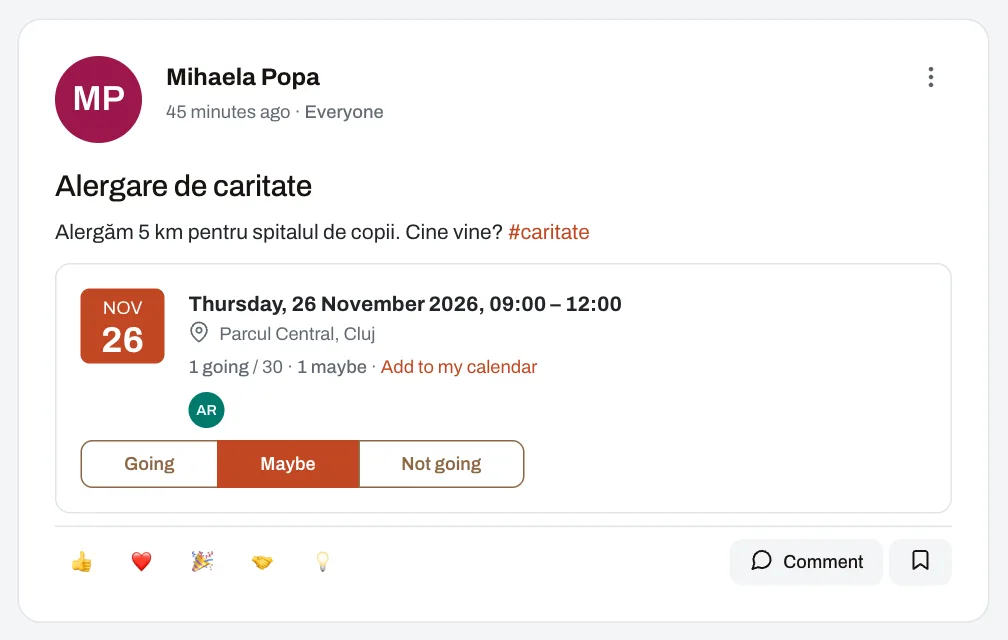
Some posts are not only for reading: they ask for an answer. Who is coming to the end-of-year party, which uniform people prefer, who has read the new procedure. In the company’s social network a post can carry a poll, an event with limited places or a request to confirm it was read, and the answers are gathered in one place, with no spreadsheets sent by email and no lists kept by hand.
How it works
- Write the post and choose the audience: the whole company, or particular units, departments, positions or areas within your reach. Publish it now or at a time you choose.
- Add what you are asking for. A poll, with 2 to 10 options, a single choice or several and, optionally, a closing time. An event, with the date, time, place and, if you like, the number of places. Or, for an announcement, a read confirmation.
- The audience is told. For an announcement with a confirmation, everyone in the audience gets a notification asking them to confirm.
- People answer in one click. They vote (and can change their vote until it closes), choose Going, Maybe or Not going, or press “I have read it”. Once the places are taken, nobody else can choose Going.
- The result: the author sees the poll’s percentages, who is coming to the event and who has confirmed reading, with the list of those who have not yet confirmed, downloadable as CSV. They can send those people a reminder, at most once a day.
Example: a hotel group
A group of eight hotels introduces a new allergen procedure at breakfast. HR posts the announcement to the kitchen and restaurant positions, with a read confirmation: after three days 112 of 130 people have confirmed, and HR sends the rest a reminder. The same week, a hotel manager posts a poll on the new uniforms, with three options, closing on Friday, and a training event with 25 places: once they were taken, sign-ups stopped automatically.
Polls
- Results show how many votes each option received, never who voted for what.
- After the first vote the options can no longer change; only the closing time can be moved.
Events
- Anyone who chose Going or Maybe sees the event in their Pulsika calendar and can download it as an .ics file for another calendar.
- If the time or the place changes, the people who chose Going or Maybe are told.
Who sees what
- Employees: the posts for audiences they belong to, and their own answer.
- The author: the poll results, the event answers and the confirmation list.
- Moderators and the group’s admins (for a post in a group) also see the confirmation list.
- Read confirmations are requested by the people who publish announcements: managers and HR, by default.
- If the plan includes insights, the author also sees how many people in the audience have seen the post, next to reactions, comments, votes and answers.
Limits
- Polls are not surveys: they have one question. For several questions or anonymous answers, use Anonymous surveys.
- Events in posts have no named invitations; for an event with chosen participants, use the Calendar.
- A confirmation shows that the person declared they read it, not that they understood it; to check understanding there are the tests in Training and tests.
Frequently asked questions
Can anyone see how I voted?
No. A poll’s results are only numbers per option.
How often can I send a reminder to confirm?
At most once a day, only to the people who have not confirmed yet.
What happens when the event’s places are taken?
Nobody else can choose Going; Maybe and Not going stay available.
Can I schedule the post for later?
Yes. The poll or event goes out with the post, and the audience is told only then.